API for ChatGPT Citation Tracking Built for Production
Stop building custom monitoring solutions. CitationBench offers a developer-grade REST API and hosted MCP server to track ChatGPT, Claude, and Perplexity citations alongside traditional rank data.
# Track brand citations across AI search enginesPOST /v1/research/ai-citation> { "query": "best SEO platform for agencies", "engines": ["chatgpt", "claude", "perplexity"] }chatgpt · cited: ✓ rank: 1 share_of_voice: 0.43claude · cited: ✓ rank: 2 share_of_voice: 0.21perplexity · cited: ✗ rank: — share_of_voice: 0.00# Pull historical citation trajectoryresearch.ai_citation.history> { "query": "best SEO platform for agencies", "engine": "chatgpt", "days": 30 }{ "trend": "rising", "first_cited": "2025-05-01", "streak": 14 }Citation Monitoring Is Broken Right Now
Generic SEO tools don't know what ChatGPT says about you, leaving your brand blind to AI-driven discovery.
No API exists for this
Most SEO platforms offer zero programmatic access to ChatGPT citation data, forcing teams to build fragile custom scrapers.
Rank data misses AI entirely
Tools like Ahrefs and AgencyAnalytics track Google positions but return nothing when ChatGPT recommends a competitor instead of you.
Manual checks don't scale
Monitoring citations by hand across ChatGPT, Claude, and Perplexity for multiple queries and clients is not a repeatable process.
The fix
One API. Citations from ChatGPT, Claude and Perplexity.
CitationBench exposes AI citation tracking via REST API and hosted MCP server. Call research.ai_citation.check, pull share_of_voice, schedule daily queries, and read historical trajectory — no custom infrastructure required.
Every Tool Your AI Citation Workflow Needs
Five production-ready capabilities covering citation tracking, competitive context, rank correlation, agent automation, and developer integration.
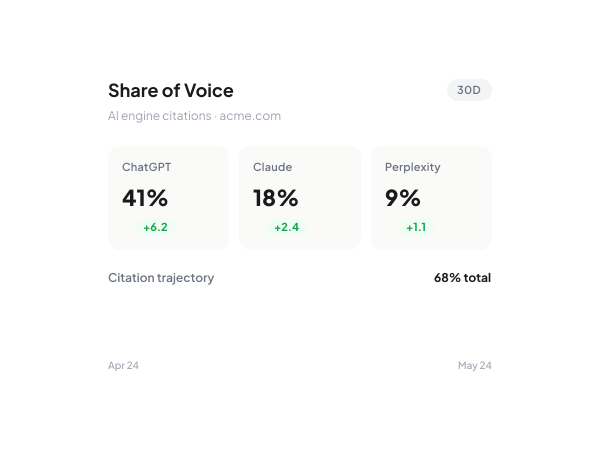
GEO Monitoring
ChatGPT Citation Tracking via REST API
Call research.ai_citation.check to query ChatGPT, Claude, and Perplexity simultaneously. Retrieve share_of_voice scores, historical citation trajectory via research.ai_citation.history, and schedule recurring daily queries per client workspace.
- ChatGPT, Claude, Perplexity
- Share of voice scoring
- Daily scheduled queries
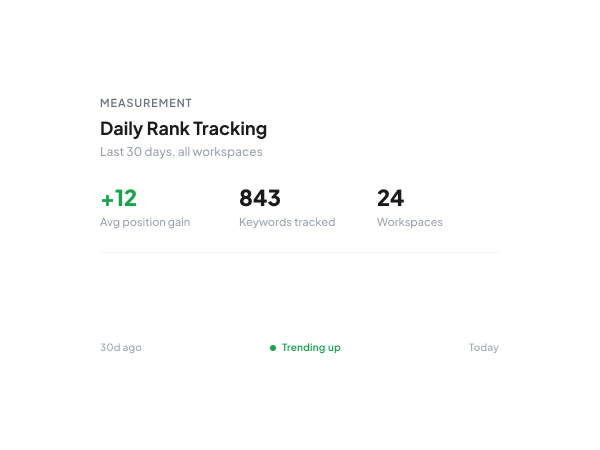
SEO Correlation
Rank and Citation Data in One Call
Daily rank tracking runs alongside AI citation checks across all workspaces scoped via X-Workspace-Id. Correlate Google position with ChatGPT citation status in a single reporting surface without stitching two separate APIs together.
- Daily rank history
- Per-workspace isolation
- Unified SEO and GEO data
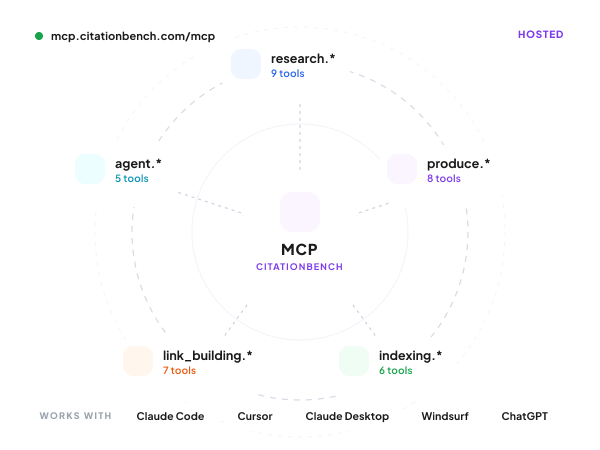
Developer Access
Citation Tracking via Hosted MCP Server
Connect to mcp.citationbench.com/mcp from Claude Code, Cursor, or any MCP client. The research.ai_citation.* tools are available immediately alongside 35 other SEO and GEO tools — no self-hosting, no infrastructure setup.
- 35 tools, no self-hosting
- Works with Claude Code and Cursor
- research.ai_citation namespace
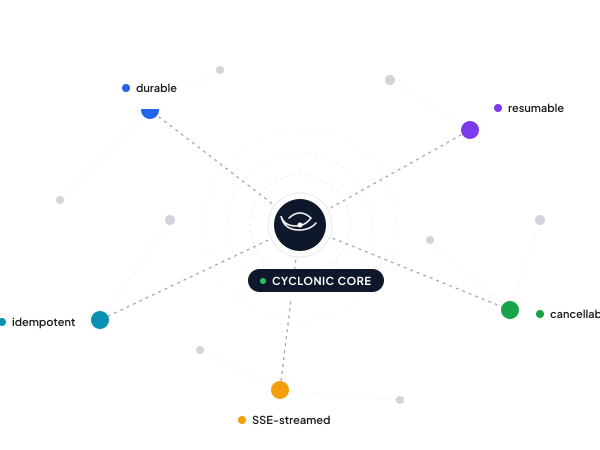
Reliability
Citation Monitoring Jobs That Never Drop
Scheduled citation monitoring runs on Cyclonic-backed durable workers. Jobs survive restarts, are cancellable via agent.invocations.cancel, and stream status in real time via SSE — not fire-and-forget cron scripts.
- Survives process restarts
- Cancellable and resumable
- SSE real-time streaming
Integration
Typed SDK for Citation API Calls
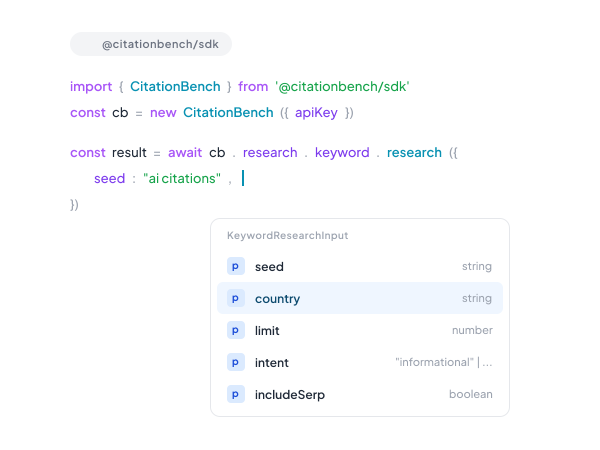
Use @citationbench/sdk to call every citation endpoint with full TypeScript type coverage. Eliminates hand-rolled fetch wrappers and keeps your integration in sync as the API evolves. Python SDK coming next.
- Full TypeScript type coverage
- @citationbench/sdk on npm
- Works alongside MCP server
How it works
From sign-up to first call in five minutes.
Sign up and get your key
An `sk_test_*` key lands in your dashboard instantly. No demo gate — start calling real endpoints with shape-complete responses.
Add the MCP server or hit REST
`claude mcp add citationbench https://mcp.citationbench.com/mcp` from Claude Code, Cursor, or any MCP client. Or `curl` against `api.citationbench.com/v1/*` directly.
Run a tool or invoke an agent
Every tool returns shape-complete demo data without auth, so your agent works before the user signs up. Tools across research, production, indexing, link-building, and agents.
Scope to a workspace and ship
Add `X-Workspace-Id: ws_***` to scope per client. Switch to a live `sk_live_*` key when you're ready. Same API surface, same SDK.
Why CitationBench
Built for production, agency-scale, and AI-agent-first.
~35 tools, one MCP server
Hosted at mcp.citationbench.com/mcp. Works with Claude Code, Cursor, Claude Desktop, Windsurf, and ChatGPT Apps. No self-hosting required.
Durable jobs, not fire-and-forget
Every long-running call runs on Cyclonic workers — survives restarts, cancellable, resumable, streams via SSE. Production-safe by default.
Multi-workspace from day one
One master API key, N client workspaces. Switch with a single `X-Workspace-Id` header. Per-client data isolation, bulk ops across all of them.
Demo mode out of the box
Every endpoint responds in shape-complete demo mode without auth, so you can build the agent before the user signs up.
FAQ
Common questions
Start Tracking ChatGPT Citations via API
CitationBench gives developers and agencies a production-ready API and MCP server to monitor AI citations without building custom tooling.
View API Docs